Skip to content
Guide · Permit drawings

How to draw a dock permit plan

Updated

10 min read
Usually three drawings: a vicinity map, a scaled site plan with property lines extended into the water, setbacks and dimensions, and a cross-section with high and low water. Add a north arrow and a scale bar, label every distance a reviewer checks, and match your office’s checklist.
On this page
01

What reviewers look for: the checklist

Washington’s joint application asks for a vicinity map, a plan view and a cross-section, with upland features[1]. Lake of the Ozarks wants distances to property lines, neighboring docks and the channel[2]. Duke Energy lists a plan & profile drawing[3]. Together:

Every sheet

  • Title block: project, applicant, sheet, date
  • North arrow
  • Graphic scale bar
  • Readable when printed at 8.5×11″

Site plan (plan view)

  • Side property lines, extended into the water
  • Shoreline and the ordinary high-water line
  • Setback lines, dimensioned
  • Dock outline with overall dimensions
  • Reach past high water
  • Distances to neighboring docks and the channel
  • Existing structures
  • Water depths along the dock
  • Deck area, if limited

Cross-section

  • High and low water, with the datum named
  • Lakebed profile from your soundings
  • Pilings or floats, and the gangway
  • Deck height above the water (freeboard)
  • Distance from high water
  • Vertical exaggeration stated

Vicinity map

  • The water body and the site marked
  • Nearby roads and landmarks
02

Site plan vs cross-section (vs vicinity map)

The site plan says where and how big; the cross-section says how deep and how high; the vicinity map says which property.

The three views in a dock permit drawing set
  • Site plan
    Answers
    Where, and how big.
    Must show
    Property lines extended, setbacks, high-water line, dimensions, distances, north arrow, scale.
  • Cross-section
    Answers
    How deep, and how high.
    Must show
    High and low water on a datum, lakebed, floats or pilings, deck height.
  • Vicinity map
    Answers
    Which property.
    Must show
    Water body, roads, the site marked.
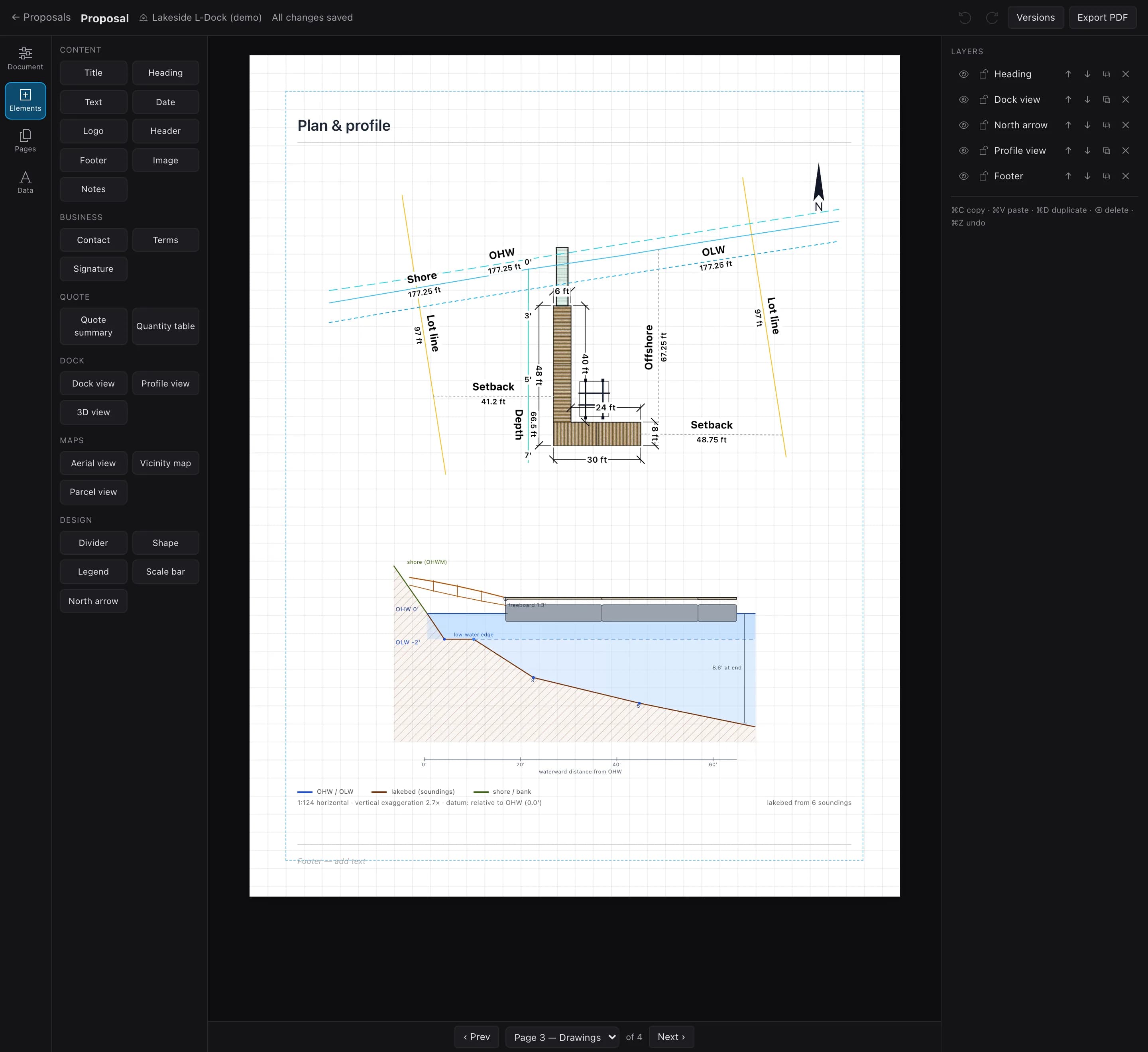
Plan & profile · Dock BuilderFig. 1
A plan and profile page made in Dock Builder: the dimensioned L-shaped dock between two lot lines, with shore, high-water (OHW) and low-water (OLW) lines, setbacks of 41.2 and 48.75 ft, an offshore distance of 67.25 ft, depth soundings and a north arrow; below it the cross-section with high water at 0 ft, low water at −2 ft and the lakebed from soundings.
Site plan and cross-section on one sheet: setbacks, reach past high water, soundings, north arrow.
03

Scale and paper size

Pick paper first, then the scale. The Corps needs 8½×11″ black-and-white drawings for public notice and Washington’s fish and wildlife agency takes up to 11×17″[1]; Lake of the Ozarks wants drawings to scale on 8½×11″[2]; Georgia Power asks for drawings to scale or dimensioned, on 8½×11″ reproducible paper[4].

Then choose the largest scale that fits the dock and the property lines on one sheet. Letter paper leaves about 7½ inches of drawing width:

How long a 100-foot dock draws at common engineering scales
  • 1″ = 10′
    Ratio
    1:120
    100 ft on paper
    10 in
  • 1″ = 20′
    Ratio
    1:240
    100 ft on paper
    5 in
  • 1″ = 30′
    Ratio
    1:360
    100 ft on paper
    3.3 in
  • 1″ = 40′
    Ratio
    1:480
    100 ft on paper
    2.5 in
  • 1″ = 50′
    Ratio
    1:600
    100 ft on paper
    2 in

1 inch = N feet is a ratio of 1:(12 × N).

  • Always add a graphic scale bar; a written ratio breaks when a sheet is resized.
  • Exaggerate the cross-section’s vertical scale and say so, as Washington suggests[1].
  • In Dock Builder, a Dock view fits its frame or locks to 1:10–1:200, and a scale bar draws the bar and ratio. If your office requires 1″ = 20′ (1:240), ask whether a graphic scale is acceptable.
04

Property lines extended, and setbacks

Reviewers check that the dock stays inside your share of the water. To show it:

  • Extend each side property line past the end of the dock, by your authority’s method; Wisconsin defines riparian zones several ways[5].
  • Draw the setback line inside each property line at the required distance — Florida lists 25 ft on state-owned submerged land[6].
  • Dimension the gaps to each property line, neighboring docks and the channel[2].
  • State the area if it’s limited — TVA caps a residential footprint at 1,000 sq ft[7].
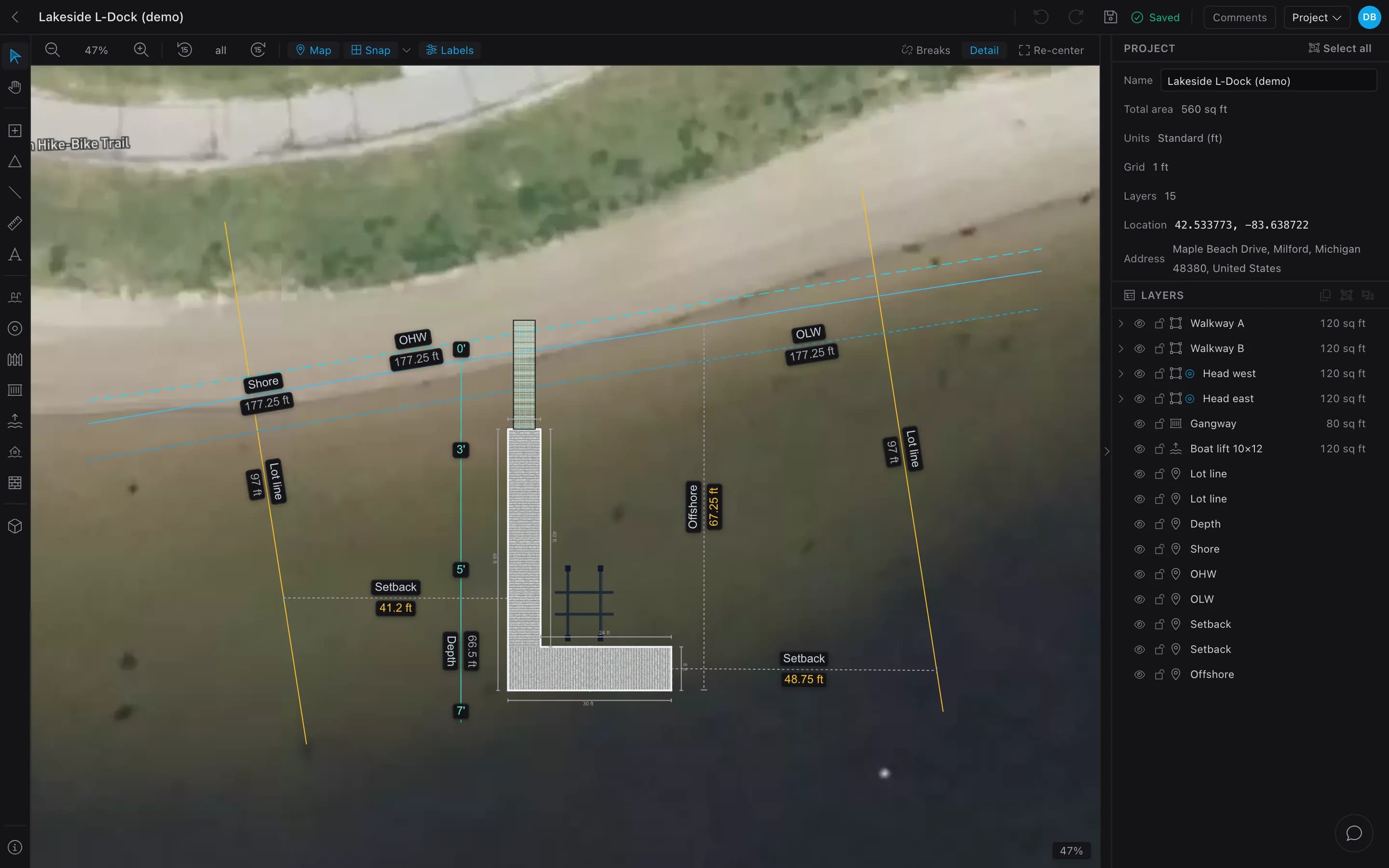
Site markup on the aerialFig. 2
In Dock Builder: two property boundaries drawn from the shore out into the water, shoreline, high-water and low-water lines, side setbacks of 41.2 and 48.75 ft from the dock to each boundary, an offshore extent of 67.25 ft and a depth line.
Property boundaries run out into the water; setbacks are dimensioned to each one.
05

Depths, and high and low water

The cross-section needs real depths tied to a datum. Dock drawings commonly use ordinary high water (OHW) as 0.0′, with ordinary low water (OLW) below it. If your authority names a different datum, use theirs.

  • Take soundings along the dock line about every 10 feet and at the far end, with a weighted tape or a marked pole.
  • Note the date and water level, then convert each reading to the datum.
  • Example: the lake is 1.5 ft below high water and you read 4.0 ft, so depth below OHW is 5.5 ft.
  • Draw high and low water on the site plan too.
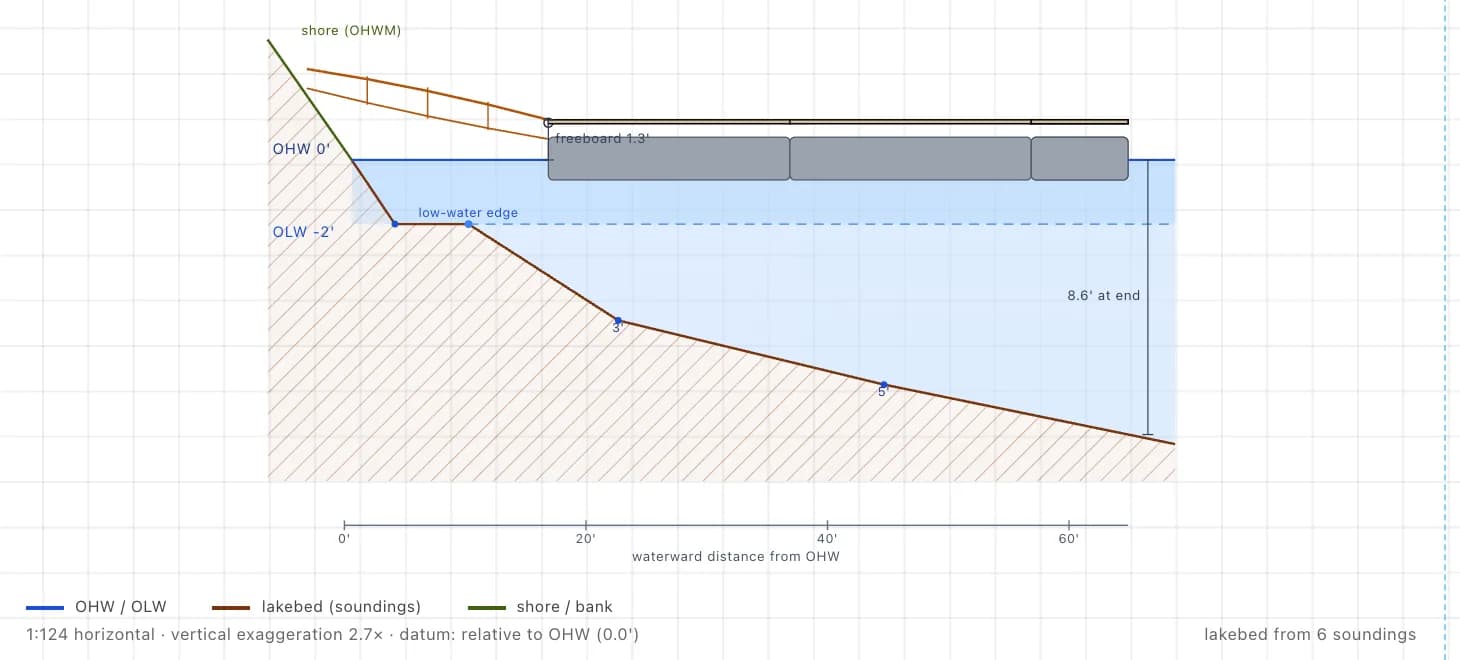
Profile view · Dock BuilderFig. 3
A cross-section from Dock Builder’s profile view: the bank, high water at 0 ft and low water at −2 ft, the lakebed drawn from six soundings, the gangway and floats with 1.3 ft of freeboard, 8.6 ft of water at the end, a distance scale from high water, and a note of 1:124 horizontal with 2.7× vertical exaggeration.
High water named as the 0′ datum, the lakebed from soundings, and the 2.7× vertical exaggeration printed.

In Dock Builder, a depth line holds a reading at every point you click; the Profile view uses it as the lakebed and prints the exaggeration.

06

Step by step in Dock Builder

Steps 1–4 need no account; steps 5–6 (contacts and the PDF) need a free one (just an email).

  1. Step 1: Open the designer and add your dock

    Place sections, L, T or U shapes, gangways, lifts and pilings.

    Add dock · signed out (demo)
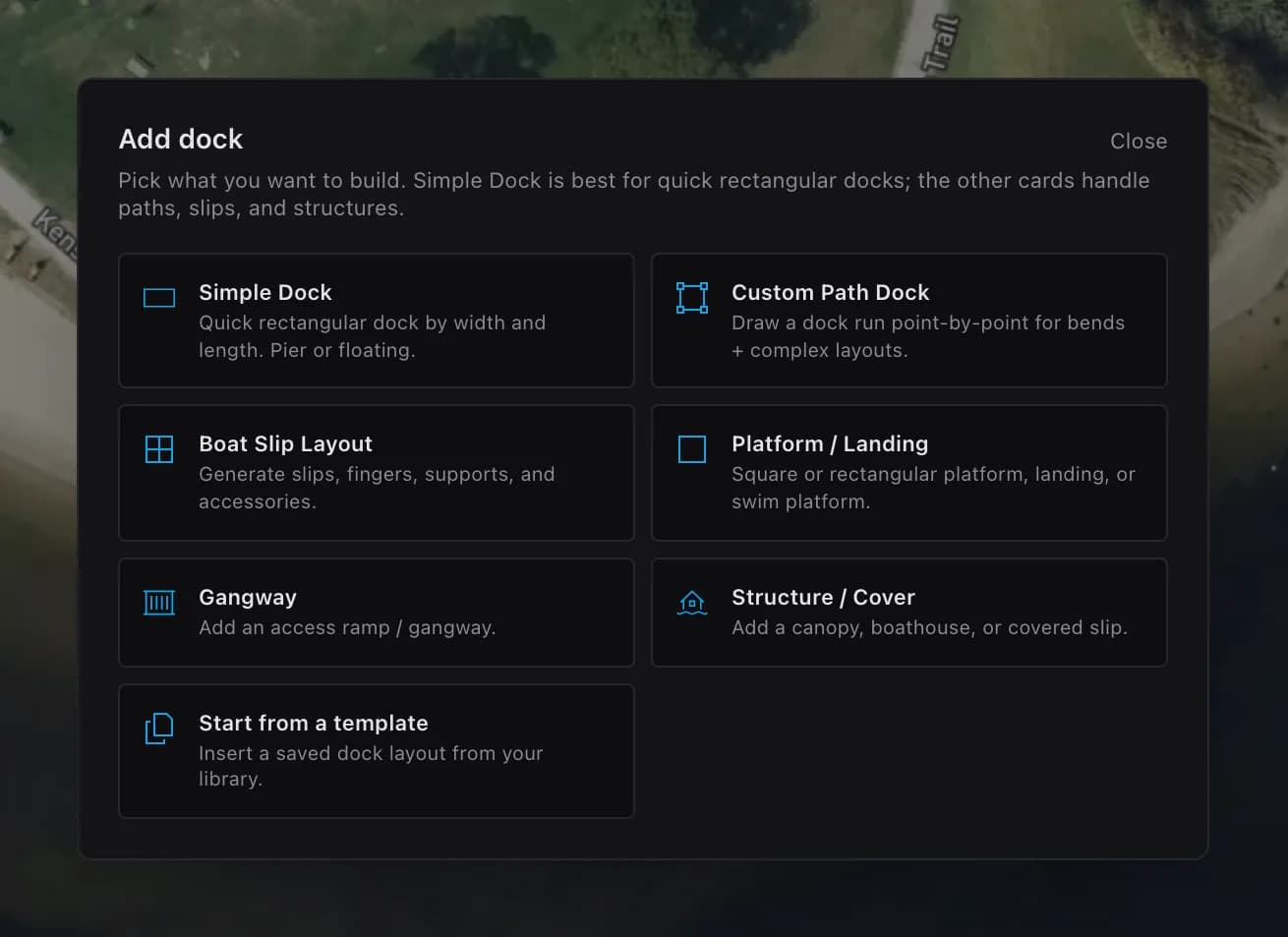
    Dock Builder’s Add dock window over a satellite map, signed out: Simple Dock, Custom Path Dock, Boat Slip Layout, Platform / Landing, Gangway, Structure / Cover and Start from a template.
    Seven starting points, from a simple dock to a saved template.
  2. Step 2: Set each section’s size and type

    Type exact sizes and choose floating or pier. These dimensions print.

    Dock section · inspector (demo)
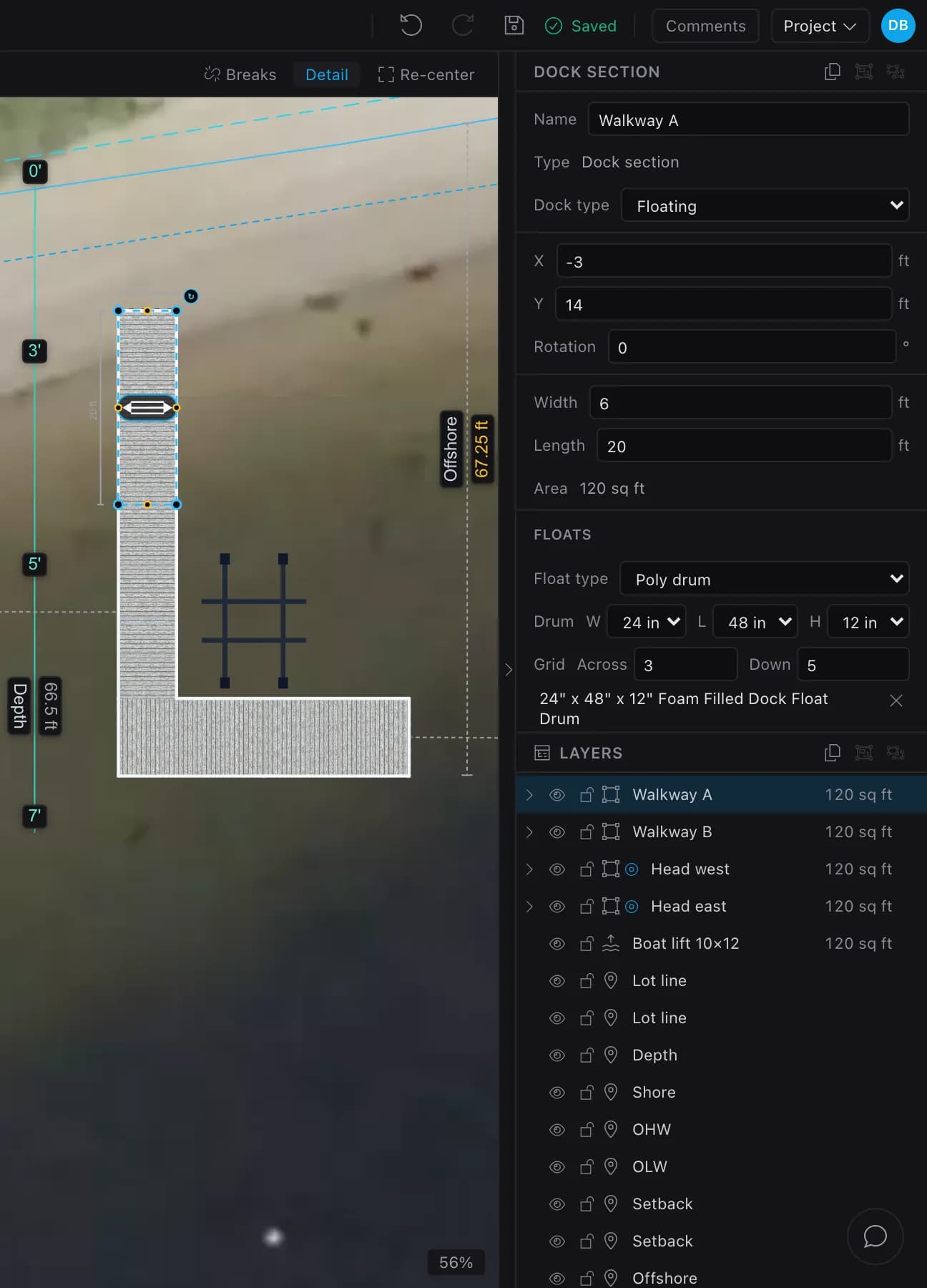
    A 6 by 20 ft dock section selected on the aerial. The inspector shows its name (Walkway A), dock type Floating, position, rotation 0, width 6 ft, length 20 ft, area 120 sq ft, and the float type and grid.
    Width, length, floating or pier, and rotation for the selected section.
  3. Step 3: Put the project on the real site

    Search an address or drop a pin. More in site & aerial map.

    Project panel · signed out (demo)
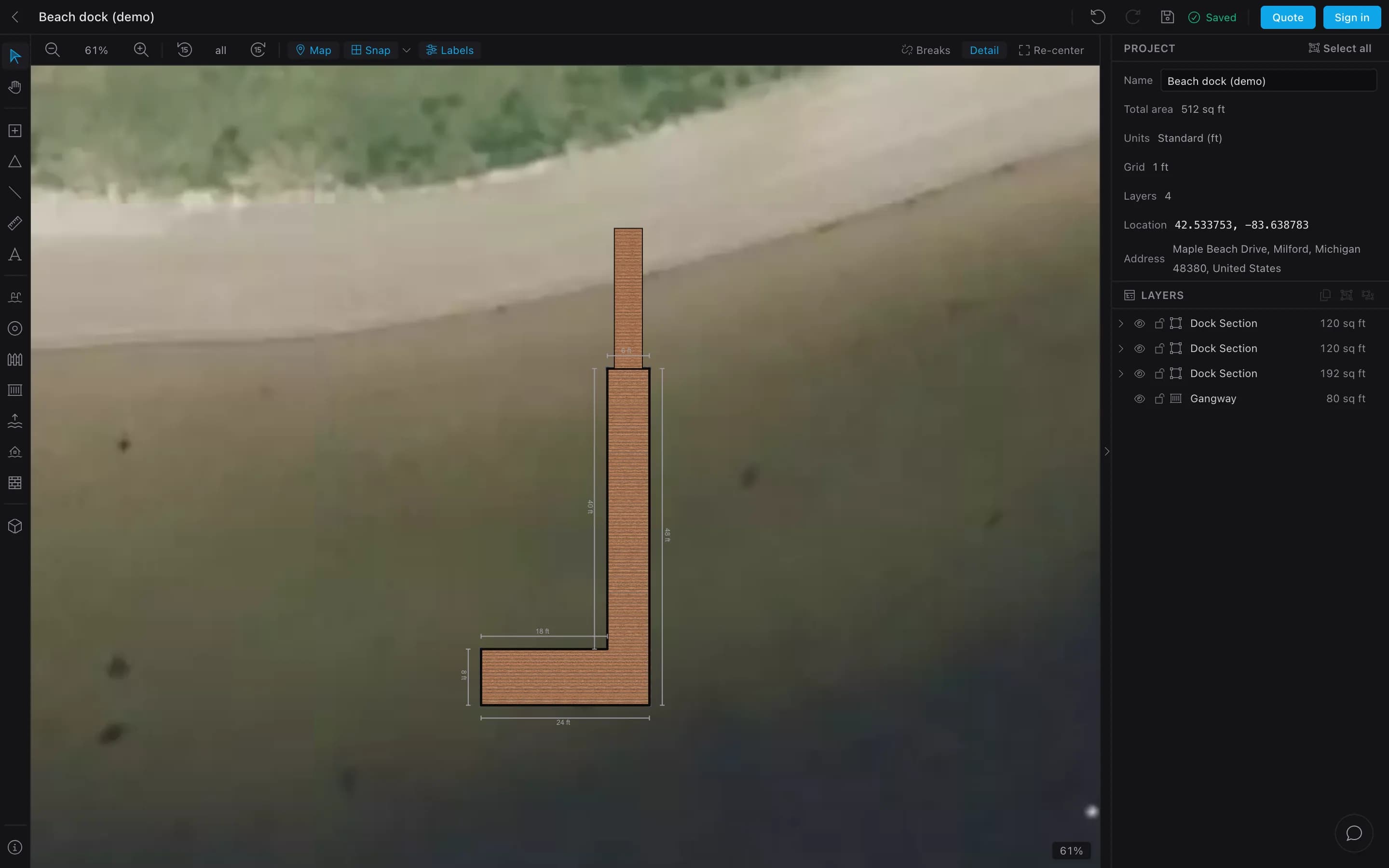
    The signed-out designer’s top bar with Quote and Sign in, above the Project panel: name Beach dock (demo), total area 512 sq ft, location 42.533753, −83.638783 and the address Maple Beach Drive, Milford, Michigan.
    Signed out, the project still carries its site: location and address on the aerial.
  4. Step 4: Draw the site lines

    Property boundaries, shoreline, high and low water, setbacks, a depth line with soundings, and measurements.

  5. Step 5: Add the applicant and engineer

    In Settings ▸ Contacts, add the applicant and any engineer of record.

  6. Step 6: Lay out the drawing pages, then export

    Open Project ▸ Export PDF and start a new proposal. Add a Dock view (fit, or locked to 1:10–1:200) and the Profile view, Aerial view and Vicinity map your checklist needs, plus a scale bar, north arrow and contacts. Pick the paper and export. More in PDFs and permit drawings.

Dock builders: give your customers this designer with your name on it

07

Why dock drawings get sent back

From the official checklists cited on this page:

  • No scale bar, or a ratio that broke when the sheet was reduced.
  • Unreadable at 8½×11″[1].
  • Property lines that stop at the shoreline.
  • Missing distances to property lines, neighboring docks or the channel[2].
  • Depths with no datum, or no high-water line at all.
  • Drawings that don’t match the written project description[1].
  • Upland features left off the site plan[1].
  • No area figure where the authority limits area[6,7].
  • A missing companion approval, such as electrical[2].
Key takeaways
  • Most dock permits want three views: a vicinity map, a site plan and a cross-section.
  • Extend property lines into the water, draw setbacks, and dimension every distance a reviewer checks.
  • Tie depths to a named datum such as ordinary high water, and state any vertical exaggeration.
  • Match the paper size first, pick the largest scale that fits, and always add a graphic scale bar.
  • Check the drawings against your authority’s checklist before you submit.

Drawing a dock plan: FAQ

What scale should a dock plan be?

Whatever your authority asks for. If it doesn’t say, pick the largest scale that fits the dock and the property lines on one sheet — for a 100-foot dock on letter paper, 1″ = 20′ (5 inches) is the largest common engineering scale that fits. Always add a graphic scale bar.

Do I need an engineer to draw dock plans?

It depends on the authority and the structure. Some accept drawings prepared by the owner or the builder; others — especially for larger or unusual docks — require an engineer’s stamp. Ask your permit office before you start. In Dock Builder you can add the engineer of record as a project contact and print their details on the drawing pages.

Can I draw my own dock plans for free?

Yes. The Dock Builder designer is free with no account, aerial map included. A free account adds the material list and the PDF export of the drawing set.

How do I show riparian setbacks on a site plan?

Extend each side property line out past the end of the dock, draw the setback line inside it at the required distance, and dimension the gap from the dock to each line. How the lines are projected over water differs by authority, so use their method.

Can I draw a dock plan on my phone?

Yes. Dock Builder runs in the browser on phones, tablets and computers, and keeps working offline after your first visit.

What drawings do I need for a dock permit?

Usually a vicinity map, a plan view and a cross-section, plus whatever your authority adds. See dock permits: what drawings you actually need for who issues permits and examples of their requirements.

Sources

  1. 1.Washington Office of Regulatory Innovation and Assistance — JARPA Instruction A — site maps and drawings (rev. 08/24, PDF) (accessed Oct 2026)
  2. 2.Ameren Missouri — Lake of the Ozarks permitting (accessed Oct 2026)
  3. 3.Duke Energy — Lake use permitting — FAQs. Lists registered surveys, a plan & profile drawing and county/local building permits among the documents an application needs (accessed Oct 2026)
  4. 4.Georgia Power — Permitting & shoreline management on Georgia Power lakes (accessed Oct 2026)
  5. 5.Wisconsin DNR — Piers and wharves exemption checklist (3/2026, PDF) (accessed Oct 2026)
  6. 6.Florida DEP — Dock permitting in Florida (Northeast District handout, PDF) (accessed Oct 2026)
  7. 7.Tennessee Valley Authority — Section 26a guidance — water-use facility dimensions and roof overhangs (accessed Oct 2026)

Requirements quoted from official pages, checked October 2026. Rules change and vary by authority; this is general guidance, not legal or engineering advice.

Keep reading