Dock Designer App alternative with a free take-off
Dock Designer App prices by the square foot at $329 a month.[1] Dock Builder counts the materials from your drawing, on a free account.
Updated
Dock Designer App vs Dock Builder
- Yes
- Partly, or with conditions
- No
- Not stated on the tool’s public pages, or doesn’t apply
| Topic | Dock Designer App | Dock Builder · free account |
|---|---|---|
| Price | $329/month, one plan; extra users are an add-on; 7-day trial, no card[1,5] | $0, no time limit |
| 2D and 3D | Yes: 2D and 3D[1] | Yes: 2D plan + 3D view |
| How it prices | Square footage, plus accessory prices[1,3] | Line by line from the take-off |
| Material list | No: No bill of materials (its FAQ)[1] | Yes: Cut list, floats, hardware |
| Permit-style drawings | Partly: 2D/3D visuals[1] | Yes: Plan, profile, site, aerial sheets |
| Proposals and sharing | Yes: Shareable outputs, quick revisions[1] | Yes: Proposal Builder PDFs, share links |
| Phone and offline | Browser app; offline not stated[6] | Yes: Phone layout; works offline |
| Designer on your website | Not stated; a Custom feature[2] | No: No |
| ERP / CRM links | No: None (its FAQ)[1] | No: No |
Dock Designer Custom and our paid plans are compared on a wider screen. Features and prices change; check the sources.
Swipe sideways to see every column →
| Topic | Dock Designer App | Dock Designer Custom | Dock Builder · free account | Dock Builder · paid plans |
|---|---|---|---|---|
| Price | $329/month, one plan; extra users are an add-on; 7-day trial, no card[1,5] | Build cost + platform subscription, scoped in a consultation[2] | $0, no time limit | Talk to us; no public price |
| 2D and 3D | Yes: 2D and 3D[1] | Yes: 2D and 3D[2] | Yes: 2D plan + 3D view | Yes: Same |
| How it prices | Square footage, plus accessory prices[1,3] | Built around your products[2] | Line by line from the take-off | Enterprise: your price book, set up with us |
| Material list | No: No bill of materials (its FAQ)[1] | Yes: BOM from the design[2] | Yes: Cut list, floats, hardware | Yes: Same |
| Permit-style drawings | Partly: 2D/3D visuals[1] | Partly: Permit packet in one named build[4] | Yes: Plan, profile, site, aerial sheets | Yes: Same |
| Proposals and sharing | Yes: Shareable outputs, quick revisions[1] | Yes: Shareable outputs[2] | Yes: Proposal Builder PDFs, share links | Yes: Your logo on quotes and PDFs |
| Phone and offline | Browser app; offline not stated[6] | Not stated | Yes: Phone layout; works offline | Yes: Same |
| Designer on your website | Not stated; a Custom feature[2] | Yes: As a custom build[2] | No: No | Yes: Your subdomain or domain |
| ERP / CRM links | No: None (its FAQ)[1] | Yes: ERP, CRM, manufacturing[2] | No: No | No: No; analytics tags only |
LightningCAD makes both Dock Designer products. Features and prices change; check the sources.
Where Dock Builder is different
A take-off, not a square-foot price
The App’s FAQ points to Dock Designer Custom for a bill of materials.[1] Dock Builder counts the lumber, decking, floats and hardware from your drawing.
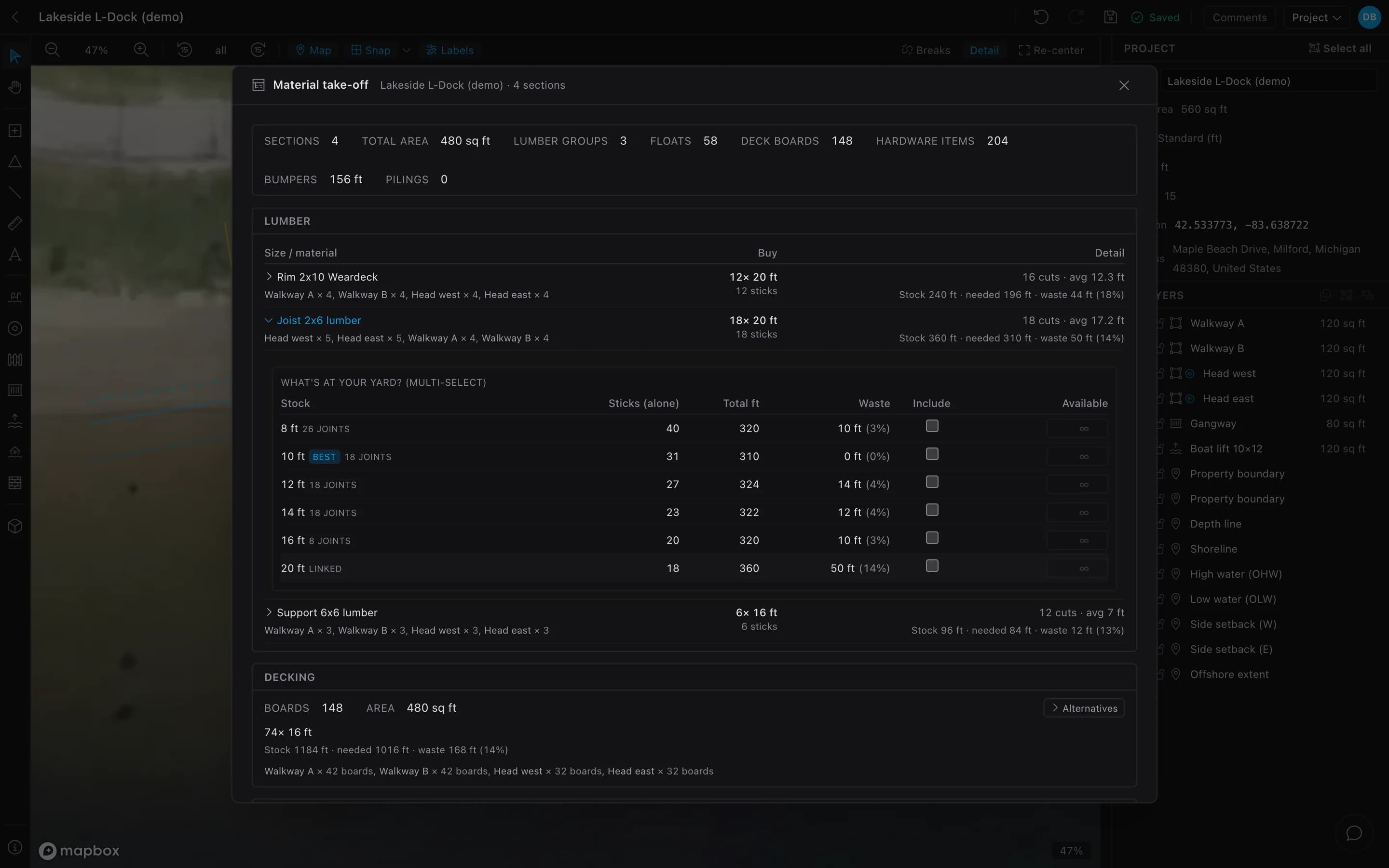
- 0118 × 20′ joists18 cuts, avg 17.2′
- 0210′ stock · 0% wasteSix stock lengths compared
- 0374 × 16′ deck boards1,016 ft needed, 1,184 ft bought
- 18 × 20′ joists18 cuts, avg 17.2′
- 10′ stock · 0% wasteSix stock lengths compared
- 74 × 16′ deck boards1,016 ft needed, 1,184 ft bought
Itemized quotes
Every take-off line gets a quantity and unit price. Labor, margin and tax go on top.
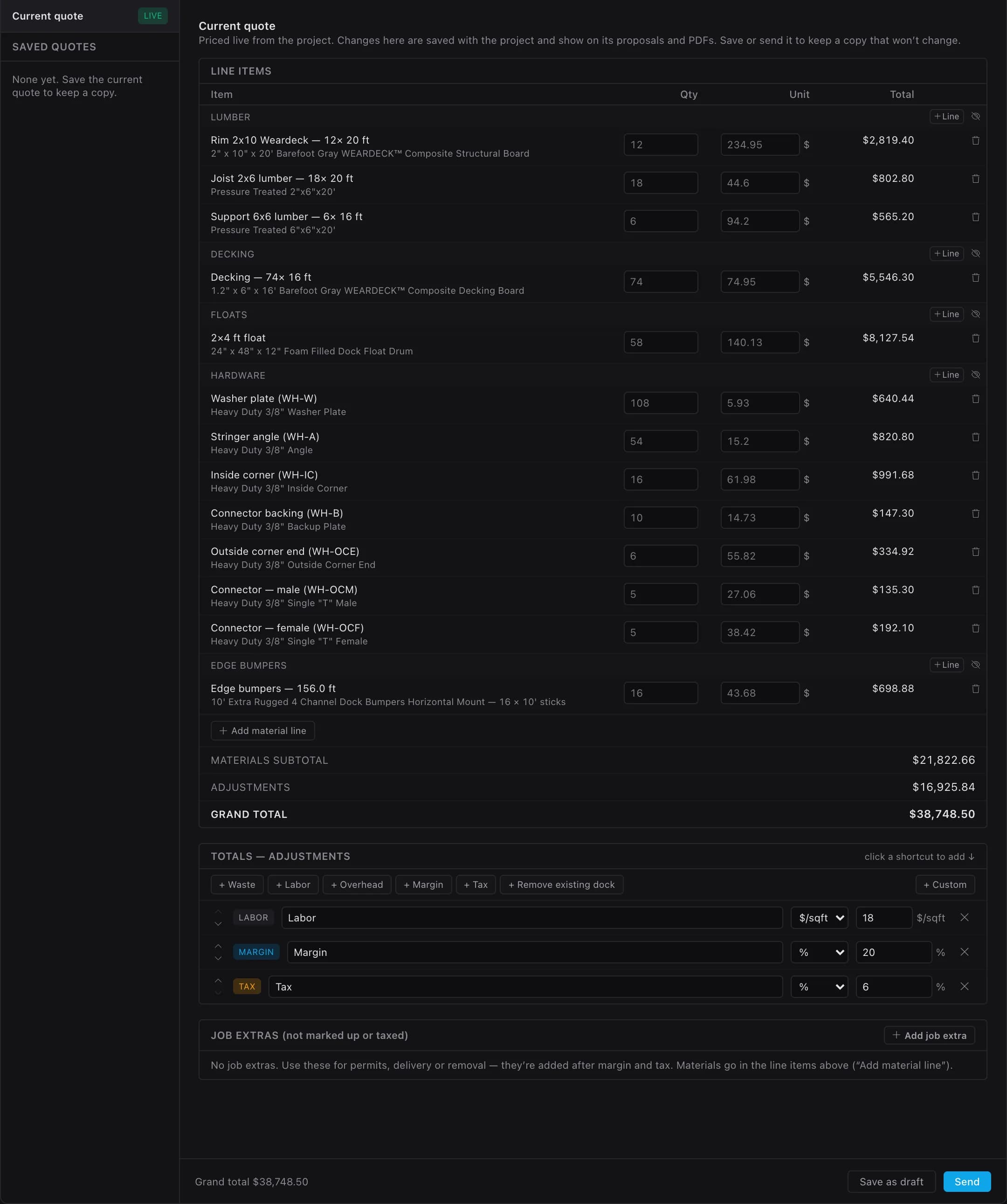
- 01Grand total · $38,748.50Materials $21,822.66 + adjustments
- 02Labor · $18/sq ft
- 03Margin 20% · tax 6%Applied top to bottom
- Grand total · $38,748.50Materials $21,822.66 + adjustments
- Labor · $18/sq ft
- Margin 20% · tax 6%Applied top to bottom
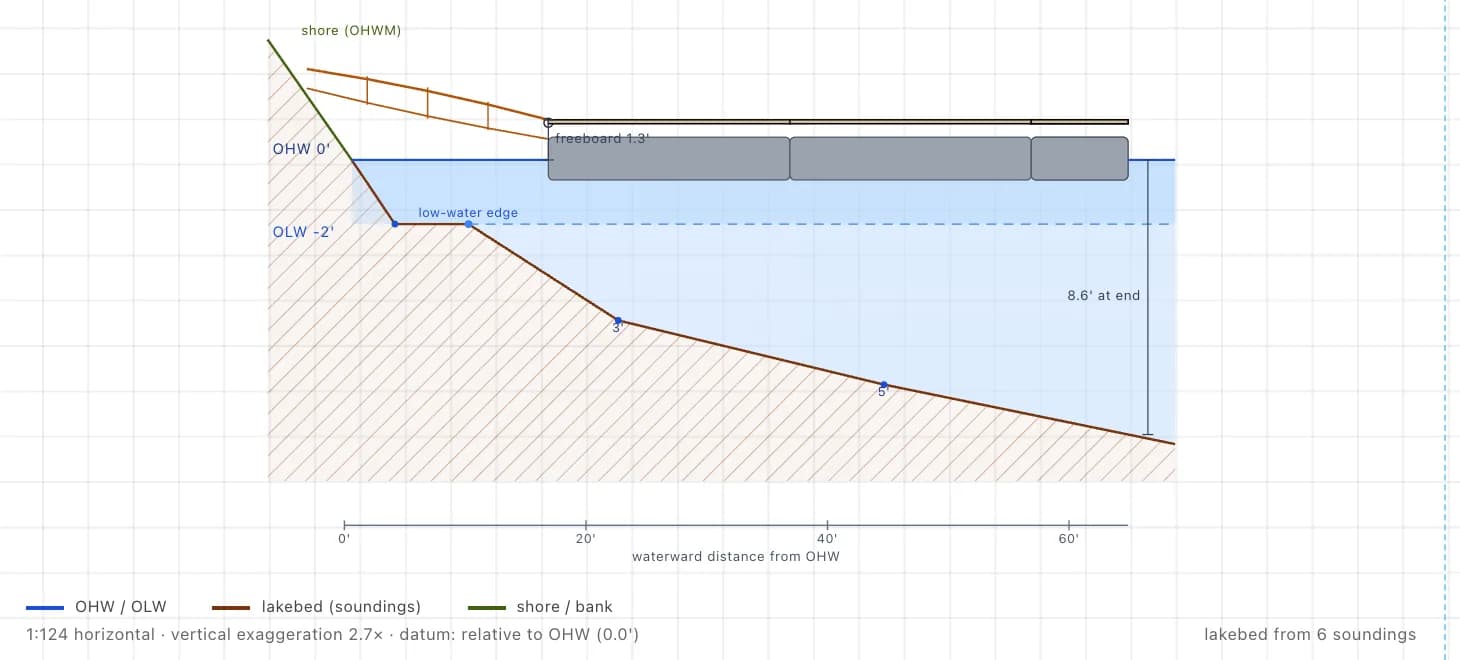
Permit-style drawings
A profile from your depth soundings, plus plan, site and aerial sheets. Requirements vary by permit office.
Offline and on a phone
The designer runs in a phone’s browser and keeps working offline after your first visit.
Your designer on your website
Pro and Business plans run the designer on your subdomain or domain. Customer drawings land in your Leads inbox.
Jake On The Lakes in Coeur d’Alene runs its dock designer at build.jakeonthelakes.com (opens in a new tab). Homeowners design their dock and send it straight to Jake for a quote.
How it worksWhen Dock Designer App or Custom fits better
- You price by the square foot.The App is built around it.[1]
- You want a published price today.Our paid plans have no public price or checkout.
- You make your own dock line.Dock Designer Custom connects design to ERP, CRM and manufacturing.[2]
- You want published case studies.LightningCAD’s include EZ Dock and American Muscle Docks.[2]
Questions builders ask
Is there a free alternative to Dock Designer App?
Does Dock Designer App make a material list?
Is the take-off engineered?
Can homeowners send me their designs?
Sources
- 1.LightningCAD — Dock Designer App (product page, FAQ) (accessed Oct 2026)
- 2.LightningCAD — Dock Designer Custom (product page, FAQ) (accessed Oct 2026)
- 3.LightningCAD — Dock Designer App (case study) (accessed Oct 2026)
- 4.LightningCAD — Coastal Pier and Dock (case study) (accessed Oct 2026)
- 5.Dock Designer App — Terms and Conditions (accessed Oct 2026)
- 6.Dock Designer App — Sign-up page (accessed Oct 2026)
Quote your next dock from one drawing.
Price a real job free: take-off, quote and drawings. Talk to us about your own designer.