Quote docks without starting from scratch.
Dock Builder helps you turn a rough dock idea into a layout, material takeoff, quote, and customer-ready plan.
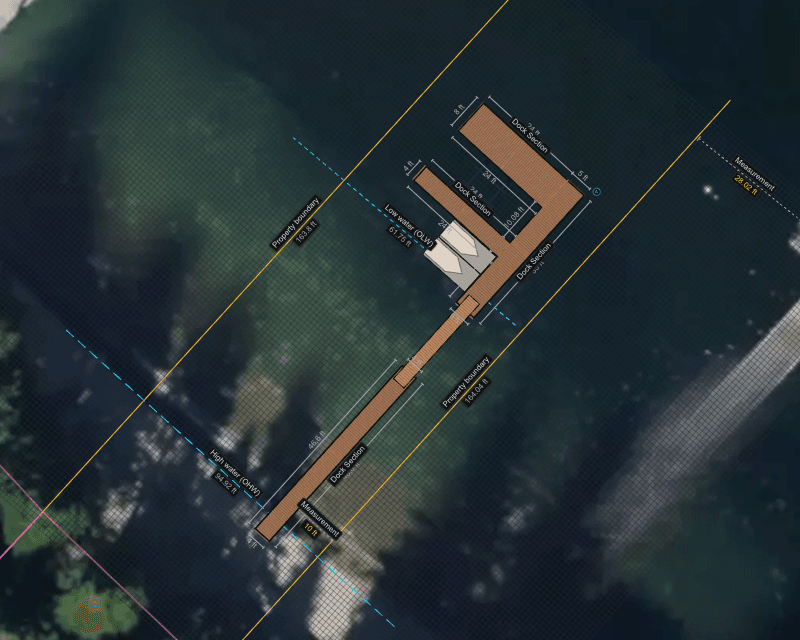
Dock quotes take too much manual work.
Most builders are still piecing quotes together the hard way:
- 01Sketch the layout.
- 02Rebuild it in another tool.
- 03Measure square footage.
- 04Count materials.
- 05Price lumber, floats, hardware, bumpers, pilings, and labor.
- 06Add margin.
- 07Make it presentable.
- 08Then redo half of it when the customer changes something.
One plan. One estimate. One quote.
Dock Builder keeps the job connected. Lay out the dock once, then use that same plan to help estimate materials, build the quote, and send the customer something they can actually understand.
No more jumping between hand drawings, SketchUp, spreadsheets, notes, and emails.
Design the dock visually.
Build the layout with dock sections, gangways, lifts, pilings, and accessories.
Move things around. Try different shapes. Adjust the size. Make changes without starting over.
Estimate from the plan.
Turn the layout into a clearer material list.
Use the design to help calculate decking, framing, floats, bumpers, hardware, accessories, and more.
Less guessing. Less hand-counting. Fewer missed parts.
Build a better quote.
Create a quote around the actual dock layout.
Add materials, labor, margin, tax, removal, and custom items so the number reflects the real job.
When the plan changes, the quote is easier to update.
Send something customers understand.
Customers do not want a messy sketch and a number — they want to see what they are buying.
Send a clean layout, project PDF, or share link so customers can review the plan and move forward with confidence.
Try it before you create an account.
You can open Dock Builder and start building right away.
What you can do with Dock Builder
Design any dock
Homeowner docks, floating docks, pier systems, and marina layouts.
Add accessories
Gangways, lifts, pilings, cleats, ladders, lighting, bumpers, and more.
Material takeoffs
Create material takeoffs straight from the dock plan.
Real quotes
Build quotes with labor, margin, tax, and custom line items.
Default products
Set default products for the materials you use most.
Share with customers
Share layouts with customers for review.
Export clean PDFs
Export project PDFs for customers, crews, or permit conversations.
Office or field
Work from the office or out in the field.
New here? Learn the builder in a few minutes.
Short, practical walkthroughs — from your first section to a signed quote and a permit-ready PDF.
Quote a dock in 10 minutes
Set the site, draw the dock, and walk out with a take-off, a quote, and a PDF.
Material take-off
How decking, framing, floats, and hardware get counted as you draw.
Quoting
Roll the take-off into a quote with labor, margin, and tax.
Free to design. More with Dock Builder.
Start drawing instantly — no signup. Upgrade to Dock Builder when you're ready to quote, export, and share.
Home Owner — free
- Design one dock — up to 3 sections, saved on this device
- Add gangways, lifts, pilings & accessories
- Take-offs, quotes, exports & sharing need Dock Builder
With Dock Builder
- Your dock projects synced to the cloud
- Material take-offs + itemized quotes
- Export customer-ready & permit PDFs
- Share a link or invite collaborators
Built around how dock builders actually quote.
Dock Builder is not trying to be a complicated CAD program. It is built for the real quoting process:
- Get the idea down→
- Figure out what the job needs→
- Price it clearly→
- Show the customer→
- Make changes fast→
- Win the job
Whether you are quoting a small private dock or a larger marina project, Dock Builder helps reduce the busywork between the first conversation and the final number.
The old way
- Draw it by hand.
- Recreate it somewhere else.
- Measure everything manually.
- Count every part.
- Build the quote separately.
- Redo the work when the layout changes.
The Dock Builder way
- Lay out the dock once.
- Use the plan to help estimate materials.
- Build the quote from the job.
- Share a clean plan with the customer.
- Update faster when something changes.
Look more prepared before the job even starts.
A clean quote does more than show a price — it shows the customer that you understand the job.
Dock Builder helps you present a better plan, explain the work more clearly, and give customers confidence before they approve the project.
Build the plan before you build the dock.
Try Dock Builder free and see how much faster your next dock quote can come together.
Start Building Free→